

Parking Overview
HqO’s Parking functionality gives end users the ability to view and book available parking spots in your site. Your team will be able to create, manage and delete parking spots from the Admin Portal. In addition, your team will have the ability to view details and manage reservations.
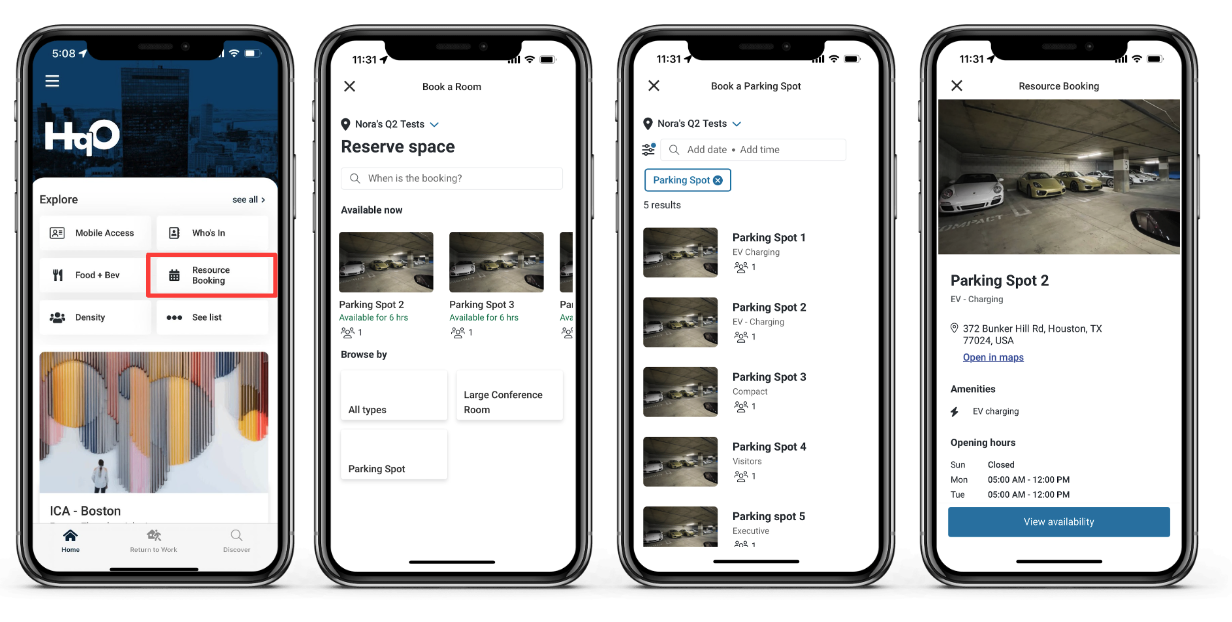
Mobile App Experience
-
User is able to view and book available parking spots
-
User is able to view upcoming reservations
-
User is able to cancel reservations
Admin Experience
-
Admins can view, accept and reject parking booking requests
-
Admins can set up new parking resources for reserving
-
Parking resources can be configured to either have reservation requests automatically accepted or so that reservation requests must be manually accepted or denied by an admin
-
A specified email will receive notifications when a new reservation is submitted
Configuring Parking
Step 1: Create HqO Resource Booking App Instance
-
Log into HqO Admin and navigate to Resource Booking under the modules tab
-
Click Add Application and select HqO Resource Booking from the Active Resource Booking Integrations popup message.
-
Click Activate
-
If users are required to check into a reserved resource, enable check in functionality
-
-
Click “My Apps / Resource Management”
Step 2: Add Resources
-
Click Add Resource
-
Fill out the necessary fields (Note: Required fields have a '*' next to the title)
-
Resource Type: Parking Spot
-
-
Click Save when ready
Step 3: Create Utility Button
Please note: This functionality is not currently available for all users in HqO Admin. If you would like to make changes to your app’s utility buttons, please contact your HqO Customer Success Manager or Implementation Manager.
View Booking Requests
Your team will have access to view and export booking requests from HqO Admin. For each request, you will see details such as:
-
Request submission date
-
Resource Name
-
Requested Date and Time
-
Requestor
-
Additional booking information
-
Booking Status
-
Total Price
On this page, your team will be able to update the status of a submitted booking if required.
Frequently Asked Questions
Can I limit who has access to book parking spots?
Yes, you will be able to assign a permission to the Utility Button for it to only appear on specific users' home screens. However, permissioning specific resources by user is not currently supported.
Can I separate out Parking and Resource Booking into two different utility buttons?
If both parking and resource booking are using HqO’s built in offerings, you will not be able to separate out the functionalities. End users will be able filter by resource type once in the Resource Booking screen.