

Who’s In Overview
HqO’s Who’s In functionality allows end users to view who is planning to be in the office on a specific date and register. This functionality helps drive office attendance and increase social engagement in the workplace.
With Who’s In analytics, the Workplace Experience team can view details for past and upcoming registrations. With this data, your team can make more informed space utilization decisions for the site.
Key Features
-
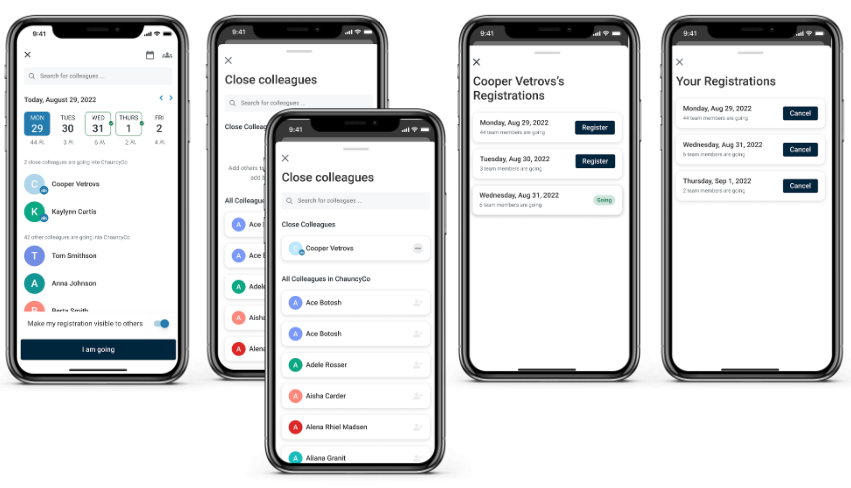
See Who’s In - Who’s In lists all users from your company and associated with the building that has registered to go into the office on a specific date.
-
See the list of registrations - View a list of the days that you’ve registered to go to the office.
-
Create a list of close colleagues - Search and select from users at your company that are associated with the building to create a list of close colleagues. Close colleagues show at the top of the list of who’s in on a given day, so you can easily find when your close colleagues will be in the office.
-
See the list of your colleagues registrations - Click on a colleague to view a list of the days that colleague has registered to go into the office.
-
Private registrations - Control which of your registrations can be seen by your colleagues.
Mobile App Experience
-
User is able to create a Close Colleagues List
-
User is able to select a specific date and see which colleagues are coming to the office
-
Close Colleagues will appear at the top of the list
-
User is able to search for a specific colleague’s name
-
-
User is able to register to attend the office
-
Option to make their registrations private. This means that registration will not be visible to colleagues, but will still appear in Admin Analytics
-
-
User can cancel an existing registration
-
User can view and manage their office registrations
Admin Experience
-
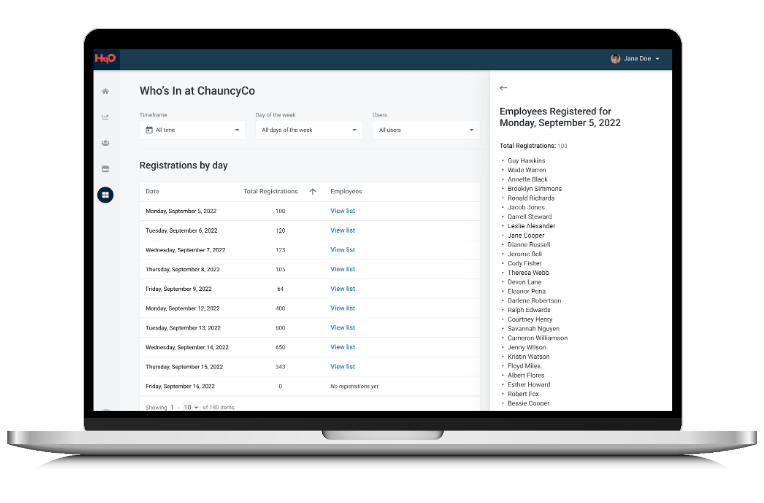
Admins can view total registrations for a date
-
Admins can filter the data by timeframes, days of the week & employee name
-
Admins can export the data as a CSV file for the selected dates/filters
Configuring Who’s In
Please note: This functionality is not currently available for all users in HqO Admin. If you would like to make changes to your app’s utility buttons, please contact your HqO Account Manager.
Frequently Asked Questions
Will users see registrations across companies?
No, end users can only see registrations for colleagues at their company.
Does this functionality sync with Desk Booking?
That is not currently supported functionality.
If an end user submits a hidden registration, will they still show up in the analytics?
Yes, all registrations will appear in the data set, whether they were visible or hidden.
Is the the default check-in date based on the building or user time zone?
The default check-in date for Who’s In is based on the user’s time zone.