

Floor Plan Overview
HqO’s floor plan functionality gives end users the ability to book a resource (desk or meeting room) through the specific floor plan. This functionality will help to limit any confusion around the location and availability of resources.
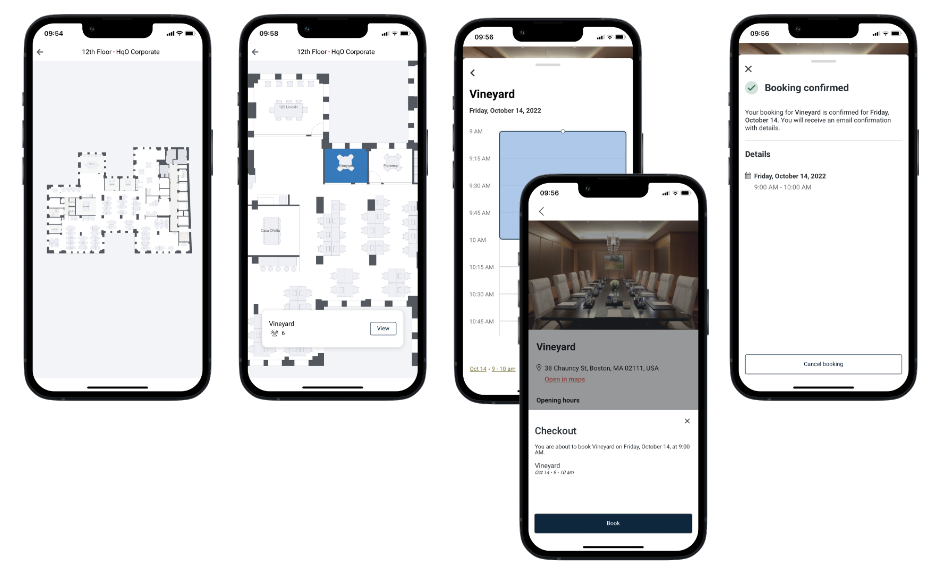
Mobile App Experience
-
User is able view and filter through floor plans for their workplace
-
User is able to view availability of resources on the floor plan for a specified date and time
-
User is able to view resource details and complete the resource booking flow by selecting a resource on the floor plan
Configuring Floor Plan
Please note: This functionality is not currently available for all users in HqO Admin. If you would like to add this feature, please contact your HqO Customer Success Manager or Implementation Manager.
Requirements
-
Clearly labeled floor plan, with each floor on a different page
-
Floor plans provided in PDF format
-
Current supported resource booking integrations partners: HqO Built-In, Microsoft Exchange & Nexudus
Frequently Asked Questions
Will users be able to filter based on neighborhoods/departments on the floor plan?
Currently adding neighborhoods to the floor plan is not supported functionality.
How do I update a floor plan?
Please reach out to your dedicated Customer Success Team or Implementation Manager to assist you with this process.