

Invite Tenant Users to Your Property
Tenant User Invites make it easy to add new users to the HqO platform and send them a branded welcome email to help them get started. Property teams can now invite users directly in the platform and choose whether or not to trigger an onboarding email.
What’s New?
When a tenant user is invited to the platform, admins can now choose to send an automated welcome email. This email introduces the HqO platform using building-specific branding and gives the user guidance on how to log in and engage with the experience.
This feature improves adoption by ensuring new users receive timely and helpful information—without requiring property teams to manually email every user.
How to Invite Tenant Users
https://scribehow.com/viewer/How_To_Add_Users_in_HqO_Admin__dOrFprBaQrebaHQWCZnoag
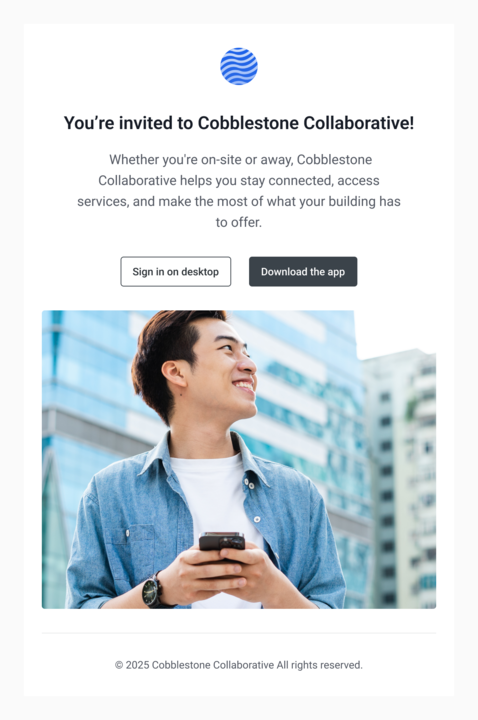
What Does the Invite Email Look Like?
The invite email uses your building’s branding and includes:
-
A short welcome message
-
A call to action to download or open the HqO app
-
Support information to help the user get started
Where Else Can I Resend an Invite?
You can resend the onboarding email at any time from:
-
The User Profile Page
-
The User List Page
Admin Controls and Tracking
-
Control delivery: Admins can suppress invites for buildings that are not yet launched.
Benefits
-
Reduce manual onboarding effort
-
Improve first-session logins
-
Deliver consistent and branded tenant communications
FAQs
What happens if I don’t toggle ‘Send invite email’?
The user will be added, but they won’t receive an onboarding email. You can always resend it later. The user will still be able to sign up in the app with pre-configured roles or settings set during the invite flow.
What if a user didn’t receive the email?
You can resend the email from their profile or the user list view. You can also reach out to HqO Support team to validate if the email is valid.