

Overview
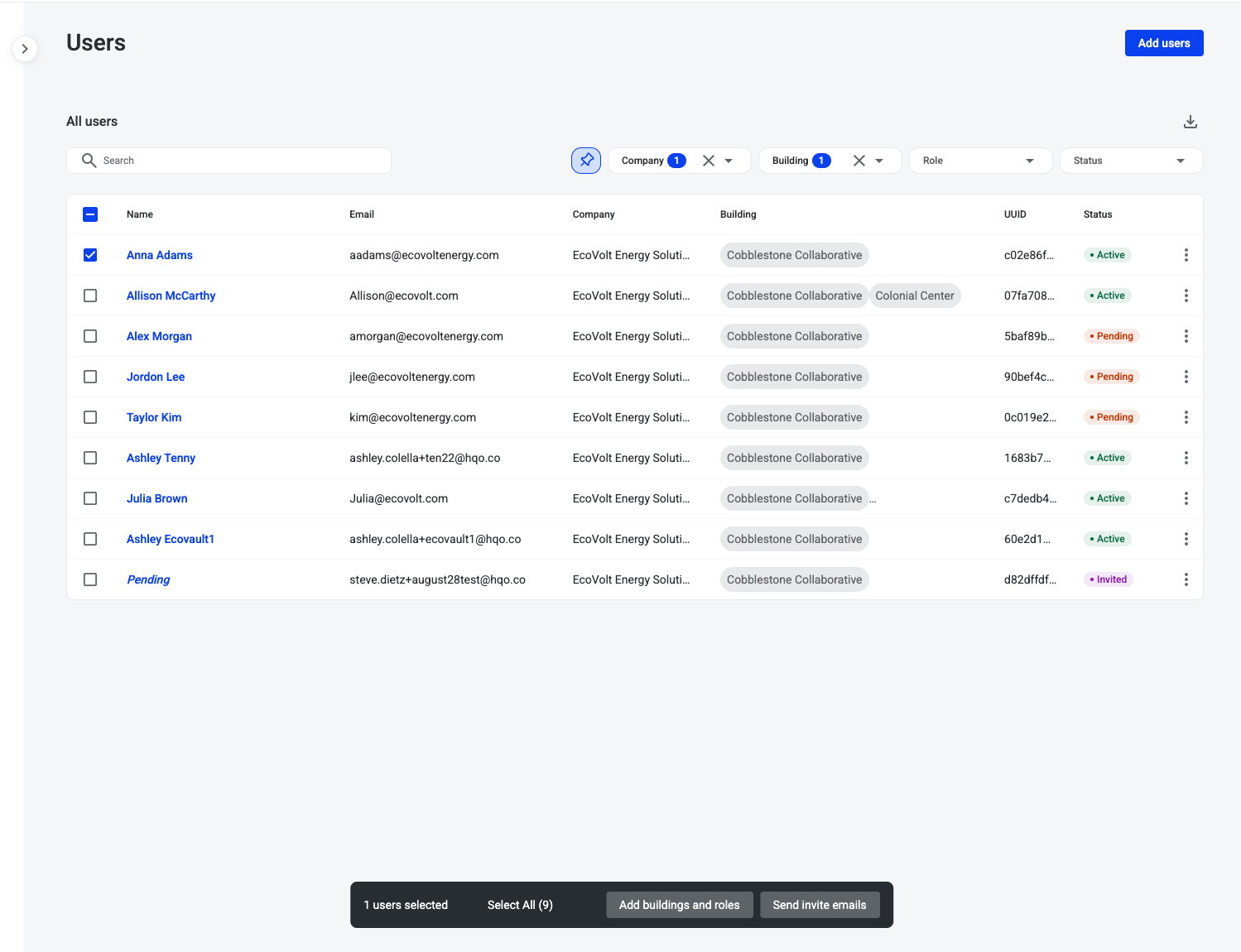
The User List Page gives administrators a centralized, structured view of all users within their accessible buildings. It provides an at-a-glance list with powerful filtering, search, and bulk action tools, making it easier to invite, manage, and audit users at scale.
This feature is designed to streamline user administration, reduce manual overhead, and ensure that building-level access and user information remain transparent and easy to control.
What This Feature Solves
Managing large numbers of tenant and building admin users across multiple buildings can be challenging without the right tools. The User List Page solves this by:
-
Providing a single list view of all users in scope.
-
Enabling quick searches and advanced filters by company, building, role, or status.
-
Supporting bulk management actions like assigning roles or resending invites.
-
Allowing CSV downloads for audits and offline reference.
With these capabilities, administrators can efficiently manage onboarding, track user statuses, and maintain accurate user records.
Key Capabilities
Add Users
-
Use the Add Users button to invite new users directly from the list page.
Search
-
Search across all users within your building scope by name, email, or company.
Filters
-
Apply filters to narrow the list by:
-
Company
-
Building
-
Role
-
Status (Active, Invited, Pending, Deactivated)
-
-
Each filter supports search within the dropdown, making it quick to find specific values.
-
The pinned filter button ensures commonly used filters are always accessible.
Download Users
-
Export the current filtered view into a CSV file for offline analysis, audits, or reporting.
User List View
Each row provides a clear snapshot of user details:
-
Name
-
Email
-
Company
-
Building(s)
-
UUID
-
Status (Active, Invited, Pending)
User Actions
-
Resend Invite to users with an Invited or Pending status.
-
Three-dot action menu for additional user management options (varies by configuration).
Bulk Actions
-
Select users individually or use the “select all” checkbox to manage multiple users at once.
-
The bulk action bar allows you to:
-
Assign buildings and roles.
-
Resend invitation emails.
-
Benefits for Admins
-
Faster Onboarding: Quickly add or invite multiple users at once.
-
Simplified Access Management: Easily filter by role, company, or building to manage permissions.
-
Improved Accuracy: Export CSVs for audits and maintain consistent records.
-
Operational Efficiency: Bulk tools save time and reduce repetitive manual work.