

Density Overview
Manage the number of people in your workplace and reduce crowding, allow your end-users to access data through the HqO app.
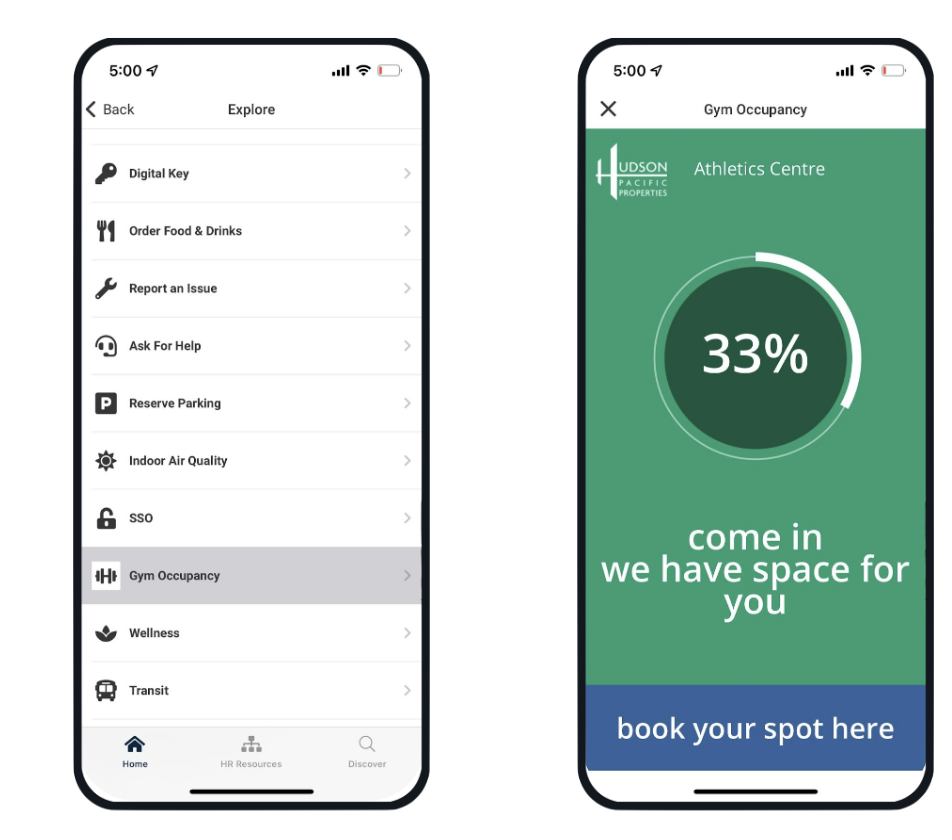
HqO & Density
HqO supports Density’s full solution through a Webview URL integration.
Mobile Experience
-
User can view occupancy in different spaces
-
Customization of Density dashboards: Logos, colors, exact language, customized visualizations of data
-
Include multiple dashboards for different spaces
-
Users can click to reserve time if space allows
Admin Experience
All Admin experiences will remain in Density’s back office. HqO only supports the Tenant/End User experience via the HqO mobile app.
Configuring Density
To configure Density within the HqO app, HqO will need access to the Webview URLs associated with the customer's account (which will be provided by Density to HqO).
If you do not have Density included in your HqO Contract, or you are interested in learning more about the offering from Density, please reach out to your HqO Customer Success Manager to learn more.
Currently, the HqO & Density integration is available globally, but does have restrictions on account size & end-users.